


Facebook said on Monday it is testing a lightweight version of its mobile app for mobile phones with poor-quality internet connections in emerging markets.
A spokesman told AFP in an email that the 'Facebook Lite' Android app is designed "for people on 2G (second generation) connections or in areas of limited internet accessibility."
The move expands Facebook's efforts to grow the world's biggest social network, which already has more than a billion users.
Most of Facebook's growth is coming from emerging markets, but many people lack the phones or computers needed for the full-featured app.
The 'lite' version can allow users with low-cost Android handsets to quickly load Facebook feeds and photos.
Technology news website TechCrunch said the app was launch in several countries in Asia and Africa over the weekend, including Bangladesh, Nepal, Nigeria, South Africa, Sri Lanka, Sudan, Vietnam and Zimbabwe.
Facebook has previously launched a version of its service for people with simple mobile phones.
Showing posts with label Facebook. Show all posts
Showing posts with label Facebook. Show all posts
Tuesday, 30 June 2015
Facebook launches new version of Lite for 2G users in India


Wednesday, 22 February 2012
How to change your Facebook Upload Email Address – account hacked
You have many “likes” in your Facebook wall post, haven’t you? But what will you do when your friend’s complains about your non-sense links in your wall post? Refer to the image below which I’ve encountered just few hours ago.
 The above image excerpt is from my profile page where it says, ” I just saw Miley Cyrus enjoying in public with her new boyfriend :O —>> <Link to the website>.
Facebook shows the short information about the source of the post whenever you update it from anywhere except Facebook from your computer browser.
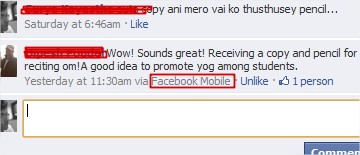
A comment posted via Mobile Phone device
In the first image you can see from where the wall post was done (highlighted in red box). Yes! Email, this was how new and undesired contents were being posted in my Wall.
This kind of spams certainly appears when you grant permission to unknown applications. This will allow them to fetch all of your private data, including your Facebook Email Upload address.
If you are victim of such spams via Email uploads, you may want to change your Facebook Email Upload address then this tutorial certainly will help you.
First of all go to your profile homepage where you can post things on the wall. In the wall posting region click on Photos icon next to Attach.
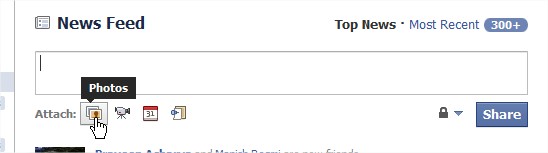
Click on Attach Photos Icon
Next click on Upload a Photo link.
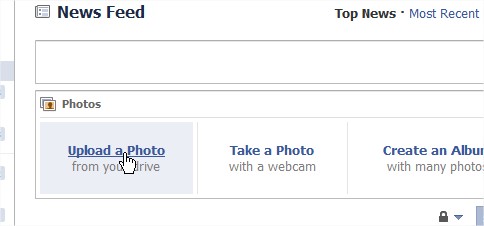
In next change click on Upload via Email link.
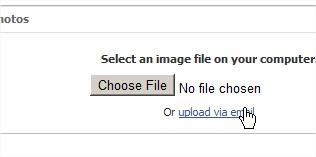
Click on Upload via email link
This will show you your current Facebook Email Upload address.
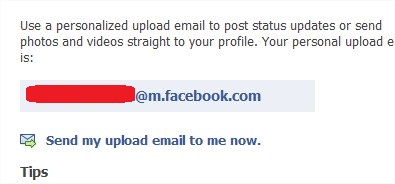
Your current Facebook Upload Email address
This is probably the email address that the spammer might have been using to post contents in your Wall. You’ll have to refresh it change it do different one. To do so, click on refresh your upload email link at the end of the paragraph.
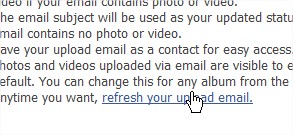
Refreshing your Facebook Upload Email Address
Next, confirm that you want to refresh the email address by clicking on Reset button.
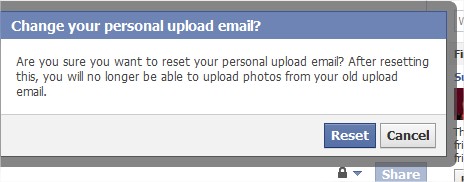
Reset Facebook upload Email
Next, it will show you a success message with the new email address. Keep it secure and don’t let suspicious applications to access your private data.
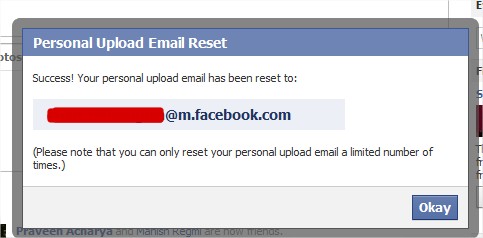
Email address reset success information
Subscribe to:
Posts (Atom)


