Pages

Subscribe:

Ads 468x60px

Showing posts with label How to. Show all posts

Tuesday, 21 August 2012

How to download youtube videos on your Android Phone

TubeMate YouTube Downloader is a free app that lets you download and watch YouTube videos on an Android device.
If you're a YouTube addict, then TubeMate YouTube Downloader is the perfect app for you. Besides, allowing you to watch movies on your phone, it allows you to download YouTube videos in a variety of video formats and resolutions, or as MP3 files. This means you can watch YouTube clips and listen to songs without connecting to the internet.
TubeMate
The Preferences section of TubeMate YouTube Downloader is packed with options to customize your downloads. You can choose to store temp files, queue up downloads, change the destination folders, etc. There's even a Fast Download mode that uses multiple connections to make quicker video downloads.
In general, TubeMate YouTube Downloader is easy to use, although some users might not be fans of the floating toolbar that's used for sharing YouTube links and searching for videos.
Available resolutions
 1920x1080(Full-HD): GalaxyTab, Galaxy S2, PC
1280x720(HD): high-end devices
640x360: general devices
320x240: low-end devices
640x360, 854x480(FLV) : Android 2.1 and over
(the available options depend on the quality of the uploaded video and your device)

TubeMate YouTube Downloader is not available on android market due to google policy but you can download it from here. 
Download

TubeMateTubeMate
read more "How to download youtube videos on your Android Phone "

Tuesday, 22 May 2012

"This website/URL has been blocked until further notice either pursuant to Court orders or on the Directions issued by the Department of Telecommunications"- How to bypass this and open the blocked website

"This website/URL has been blocked until further notice either pursuant to Court orders or on the Directions issued by the Department of Telecommunications".You are getting this message because the Indian government asked internet service providers (ISP) to block websites such as The Pirate Bay,kat.ph,torrenthound which contains torrent file, File-sharing websites like mediafire,rapidshare etc, as well as video-sharing service Vimeo among others due to various complaint by copyright owners. Not only this but popular torrent search engine torrentz.eu has also been blocked but you can use other torrent search engine tscan.eu.Yesterday when i was trying to download a movies from  torrenthound it was displaying "This website/URL has been blocked until further notice either pursuant to Court orders or on the Directions issued by the Department of Telecommunications".Not only on torrent containing websites but also on video sharing and file sharing website such as mediafire and vimeo.
         Now the question is how to bypass this blocked URL to download the files.It is very simple and easy.Just use proxy server which a computer that offers a computer network service to allow clients to make indirect network connections to other network services. A client connects to the proxy server, then requests a connection, file, or other resource available on a different server.
    Here i am giving you name of some proxy with the help of which you can open the restricted websites.
1.Hide my ass
2.kroxy.net
3.proxify.co.uk
4.www.sitesurf.net

I have used HIDEMYASS to access the restricted website but you can use others proxy if this proxy is not working.I am giving you step by step guide please follow them.

STEP1:Go to hidemyass.com


Step 2:Paste the restricted URL inside the box as shown in picture.


Step 3:Now you are finished you can now see the website.


Short video tutorial that i have picked up from Youtube.In this tutorial you will learn about bypassing thepriratebay .


How simple it is to access the blocked websites.Share with your friends.

Hope you have enjoyed this article please subscribe this blog to get more interesting articles.

Also read How to open blocked websites like Facebook,Twitter,Google plus etc. from school or office


Tags:bypasstorrent,Piratebay,kat.ph,ISOHunt,Torrentz,ExtraTorrent,TorrentReactor,Demonoid,TorrentDownloads,OnlyTorrents,BitSnoop,Fenopy,TorrentPortal,Seedpeer,mastitorrent,mnova,mininova,kickass,open blockes,website,restricted,indian,isp,court,order,filestube,rapidshare,filesfactory,4shared,Megaupload,Fileserve,Hotfile,Depositfiles,Uploading.com,FileFactory,uploaded,dailymotion,YouTube,Blip,uZood,Dailymotion , Metacafe,Veoh, Hulu ,Megavideo,Revver,Vimeo,acoount suspended due to copyright violation,copyright infrigment.

read more ""This website/URL has been blocked until further notice either pursuant to Court orders or on the Directions issued by the Department of Telecommunications"- How to bypass this and open the blocked website"

Friday, 11 May 2012

Samsung mobile phones secret code and unlock codes


Software version: *#9999#                                                              
IMEI number: *#06#
Serial number: *#0001#
Battery status- Memory capacity : *#9998*246#
Debug screen: *#9998*324# - *#8999*324#
LCD kontrast: *#9998*523#
Vibration test: *#9998*842# - *#8999*842#
Alarm beeper - Ringtone test : *#9998*289# - *#8999*289#
Smiley: *#9125#
Software version: *#0837#
Display contrast: *#0523# - *#8999*523#
Battery info: *#0228# or *#8999*228#
Display storage capacity: *#8999*636#
Display SIM card information: *#8999*778#
Show date and alarm clock: *#8999*782#
The display during warning: *#8999*786#
Samsung hardware version: *#8999*837#
Show network information: *#8999*638#
Display received channel number and received intensity: *#8999*9266#
*#1111# S/W Version
*#1234# Firmware Version
*#2222# H/W Version
*#8999*8376263# All Versions Together
*#8999*8378# Test Menu
*#4777*8665# GPSR Tool
*#8999*523# LCD Brightness
*#8999*377# Error LOG Menu
*#8999*327# EEP Menu
*#8999*667# Debug Mode
*#92782# PhoneModel (Wap)
#*5737425# JAVA Mode
*#2255# Call List
*#232337# Bluetooth MAC Adress
*#5282837# Java Version
#*4773# Incremental Redundancy
#*7785# Reset wakeup & RTK timer cariables/variables
#*7200# Tone Generator Mute
#*3888# BLUETOOTH Test mode
#*7828# Task screen
#*#8377466# S/W Version & H/W Version
#*2562# Restarts Phone
#*2565# No Blocking? General Defense.
#*3353# General Defense, Code Erased.
#*3837# Phone Hangs on White screen.
#*3849# Restarts Phone
#*7337# Restarts Phone (Resets Wap Settings)
#*2886# AutoAnswer ON/OFF
#*7288# GPRS Detached/Attached
#*7287# GPRS Attached
#*7666# White Screen
#*7693# Sleep Deactivate/Activate
#*2286# Databattery
#*2527# GPRS switching set to (Class 4, 8, 9, 10)
#*2679# Copycat feature Activa/Deactivate
#*3940# External looptest 9600 bps
#*4263# Handsfree mode Activate/Deactivate
#*2558# Time ON
#*3941# External looptest 115200 bps
#*5176# L1 Sleep
#*7462# SIM Phase
#*7983# Voltage/Freq
#*7986# Voltage
#*8466# Old Time
#*2255# Call Failed
#*5376# DELETE ALL SMS!!!!
#*6837# Official Software Version: (0003000016000702)
#*2337# Permanent Registration Beep
#*2474# Charging Duration
#*2834# Audio Path (Handsfree)
#*3270# DCS Support Activate/Deactivate
#*3282# Data Activate/Deactivate
#*3476# EGSM Activate/Deactivate
#*3676# FORMAT FLASH VOLUME!!!
#*4760# GSM Activate/Deactivate
#*4864# White Screen
#*7326# Accessory
#*7683# Sleep variable
#*3797# Blinks 3D030300 in RED
#*7372# Resetting the time to DPB variables
#*3273# EGPRS multislot (Class 4, 8, 9, 10)
#*7722# RLC bitmap compression Activate/Deactivate
#*2351# Blinks 1347E201 in RED
#*2775# Switch to 2 inner speaker
#*7878# FirstStartup (0=NO, 1=YES)
#*3838# Blinks 3D030300 in RED
#*2077# GPRS Switch
#*2027# GPRS Switch
#*0227# GPRS Switch
#*0277# GPRS Switch
#*22671# AMR REC START
#*22672# Stop AMR REC (File name: /a/multimedia/sounds/voice list/ENGMODE.amr)
#*22673# Pause REC
#*22674# Resume REC
#*22675# AMR Playback
#*22676# AMR Stop Play
#*22677# Pause Play
#*22678# Resume Play
#*77261# PCM Rec Req
#*77262# Stop PCM Rec
#*77263# PCM Playback
#*77264# PCM Stop Play
#*22679# AMR Get Time
*#8999*364# Watchdog ON/OFF
*#8999*427# WATCHDOG signal route setup
 #*7337# Master reset(unlock)
*2767*3855# = Full Reset (Caution every stored data will be deleted.)
*2767*2878# = Custom Reset
*2767*927# = Wap Reset
*2767*226372# = Camera Reset (deletes photos)
*2767*688# Reset Mobile TV
#7263867# = RAM Dump (On or Off)
*#7465625# = Check the phone lock status
*7465625*638*Code# = Enables Network lock
#7465625*638*Code# = Disables Network lock
*7465625*782*Code# = Enables Subset lock
#7465625*782*Code# = Disables Subset lock
*7465625*77*Code# = Enables SP lock
#7465625*77*Code# = Disables SP lock
*7465625*27*Code# = Enables CP lock
#7465625*27*Code# = Disables CP lock
*7465625*746*Code# = Enables SIM lock
#7465625*746*Code# = Disables SIM lock
*7465625*228# = Activa lock ON
#7465625*228# = Activa lock OFF
*7465625*28638# = Auto Network lock ON
#7465625*28638# = Auto Network lock OFF
*7465625*28782# = Auto subset lock ON
#7465625*28782# = Auto subset lock OFF
*7465625*2877# = Auto SP lock ON
#7465625*2877# = Auto SP lock OFF
*7465625*2827# = Auto CP lock ON
#7465625*2827# = Auto CP lock OFF
*7465625*28746# = Auto SIM lock ON
#7465625*28746# = Auto SIM lock OFF


Tags:Samsung, mobile, phones, secret, code, unlock, code,reset code, Samsung galaxy s, s2 ,note ,galaxy y, galaxy ace,galaxy tab,Samsung hero,Samsung wave,Samsung Bada,android smartphone unlock secret code.
read more "Samsung mobile phones secret code and unlock codes"

Saturday, 14 April 2012

How to Root Samsung Galaxy Y GT-S5360 android smartphone


Note before rooting your galaxy y please note that device’s warranty gets void.You can unroot Samsung Galaxy Y later in case you wish to make use of your device’s warranty. 

Follow these steps below to root Samsung Galaxy Y:
  1. First of all download Update.zip  file.
  2. Now send this downloaded file to the root of your SD Card means file should not be copied in any folder of your SD Card this is because at rooting process system can't access the file.
  3. Turn off  Galaxy Y.
  4. Now press Home button + Volume up button and Power button for 5-10 seconds to go into recovery mode.
  5. When you are in recovery mode, select “Update from SD Card” using volume down key.
  6. Now select Update.zip (the zip file you downloaded in step 1) and execute it by pressing the home button.
  7. Now your phone will be rooted after which you can select the reboot option.


read more "How to Root Samsung Galaxy Y GT-S5360 android smartphone"

Thursday, 12 April 2012

How To Browse WAP Sites on Computer or PC?

Now browse wap sites on your computer or PC.Yes its possible.There are two ways to do it:
1.Download a software called winwap and install it on your computer.Download it from here

2.you can also browse wap sites on Firefox browser by using a add-on called wmlbrowser get it from here https://addons.mozilla.org/en-US/firefox/addon/62  install it and restart the browser.


read more "How To Browse WAP Sites on Computer or PC?"

Monday, 19 March 2012

How to use your android mobile phone as a webcam | make your phone a webcam


This video shows you how to use your android smartphone camera a a webcam using a simple application
1.First you need to download the software IP webcam from the link below
2To install IP Webcam, that requires Android 2.2+, click here or scan the barcode below.


Direct android market link: https://market.android.com/details?id=com.pas.webcam&feature=search_result


Setup

  • Go here in your web browser: http://your.ip.address.here:8080/ (replace your.ip.address.here with the IP address that appears in the app on your phone). You will see instructions and a link to the video feed.
  • Download and install this program: http://webcamxp.com/home.aspx (only video, no audio; but new beta version has audio, but I didn’t test it)
  • In Skype Options > Video settings, select “IP Webcam MJPG” as the source.
  • Click on the Webcam settings button under Skype Video Settings; use the raw URL option at the top and enter your video feed address – for example http://192.168.1.1/videofeed (replace 192.168.1.1 with your IP address from the app on the phone).


read more "How to use your android mobile phone as a webcam | make your phone a webcam"

Wednesday, 22 February 2012

How to reset Nokia Lock Code without any software


There have been several tutorials and questions on internet that shows how to reset the security locking code of your Nokia Symbian Phones. But honestly speaking, non of the tutorial works. Because, most of them keeps talking about Master Code security code which really does not work in every phone.
The technique behind Master code is that, every phone has unique International Mobile Equipment Identity (IMEI) number and with the help of this number, a specific software will calculate your so called master code. This might work in some phone but not always. Because how can you be so sure about that the Master Code generated is the correct one? If it has been the straight right security code then there won’t be any use of security code. Because, Lock codes and master codes are meant for security purpose in case if it’s stolen or lost some where.
Therefore this might not be much practical. The good thing you can do is, contact the authorized service center to have your code reseted. If you don’t want to do that then still you have a choice left. That is, you’ll have to hack the phone. Don’t worry with the term ‘hack’ we’ll do nothing like hacking.
We’ll use a backdoor to reset the security code. This might be illegal, but can be helpful if you badly need it. Here is how you do it.
First of all download the security code hack patch from here. Once you have downloaded it extract it with your favorite unzipper.  Now reate a new folder ‘Recogs‘ in your desktop.
za How to reset Nokia Lock Code without any software
New Recogs folder in desktop
Once it has been created, copy the THC-NOKIA-UNLOCK.MDLfile from the extracted file toRecogs folder.
zb How to reset Nokia Lock Code without any software
Drag or copy the file to Recogs folder
Now take out the memory card from your Nokia phone and plug it in to you card reader and open it from my computer.
zc How to reset Nokia Lock Code without any software
Open your card from my computer
Once you open go to System folder. If it is not there then don’t worry it is hidden folder. To go to System folder, type ‘system‘ next to your card location as shown in the image below (in this tutorial the drive letter for the memory card is H:).
zd How to reset Nokia Lock Code without any software
Type-in system to go to system folder
Instantly you’ll be inside system folder.
ze How to reset Nokia Lock Code without any software
The System folder
Once you are inside the system folder copy the Recogs folder from desktop to the system.
zf How to reset Nokia Lock Code without any software
Recogs folder being copied to system folder
Finally when it’s copied, eject your memory card and insert it to your phone which you want to unlock. Once you insert the memory card, it will automatically start the unclocker file and resets the Locking code.
Once it succesfully resets your Locking code, it will prompt a message on white screen with, ‘Press a Key’. Press any key and your code is rested to 12345. Now you can change it any time.
Thats it, you are done. No need of any electronic device, no need of any data cards no need of any complicated and insecure software and the phone is yours again.


Hacktweaks
read more "How to reset Nokia Lock Code without any software"

How to change your Facebook Upload Email Address – account hacked


You have many “likes” in your Facebook wall post, haven’t you? But what will you do when your friend’s complains about your non-sense links in your wall post? Refer to the image below which I’ve encountered just few hours ago.
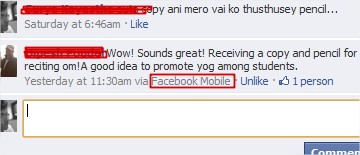
h How to change your Facebook Upload Email Address   account hackedThe above image excerpt is from my profile page where it says, ” I just saw Miley Cyrus enjoying in public with her new boyfriend :O —>> <Link to the website>.
Facebook shows the short information about the source of the post whenever you update it from anywhere except Facebook from your computer browser.
i How to change your Facebook Upload Email Address   account hacked
A comment posted via Mobile Phone device
In the first image you can see from where the wall post was done (highlighted in red box). Yes! Email, this was how new and undesired contents were being posted in my Wall.
With Facebook email upload, anything you send mail to the unique email address provided by Facebook, it will be posted in your profile page.
This kind of spams certainly appears when you grant permission to unknown applications. This will allow them to fetch all of your private data, including your Facebook Email Upload address.
If you are victim of such spams via Email uploads, you may want to change your Facebook Email Upload address then this tutorial certainly will help you.
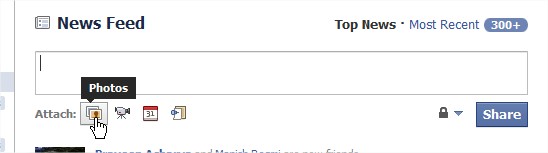
First of all go to your profile homepage where you can post things on the wall. In the wall posting region click on Photos icon next to Attach.
a How to change your Facebook Upload Email Address   account hacked
Click on Attach Photos Icon
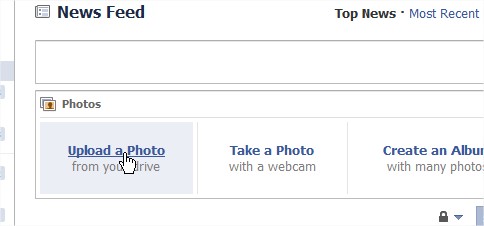
Next click on Upload a Photo link.
b How to change your Facebook Upload Email Address   account hacked
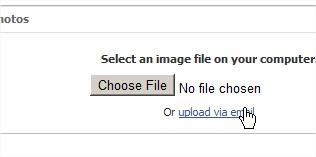
In next change click on Upload via Email link.
c How to change your Facebook Upload Email Address   account hacked
Click on Upload via email link
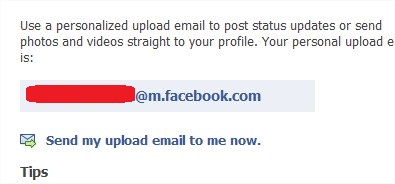
This will show you your current Facebook Email Upload address.
d How to change your Facebook Upload Email Address   account hacked
Your current Facebook Upload Email address
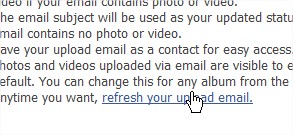
This is probably the email address that the spammer might have been using to post contents in your Wall. You’ll have to refresh it change it do different one. To do so, click on refresh your upload email link at the end of the paragraph.
e How to change your Facebook Upload Email Address   account hacked
Refreshing your Facebook Upload Email Address
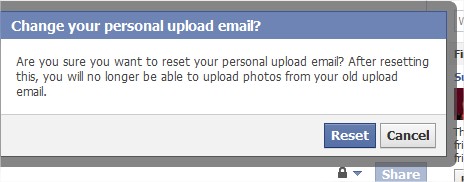
Next, confirm that you want to refresh the email address by clicking on Reset button.
f How to change your Facebook Upload Email Address   account hacked
Reset Facebook upload Email
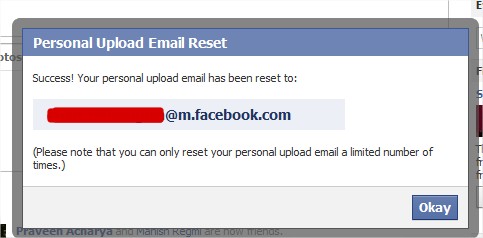
Next, it will show you a success message with the new email address. Keep it secure and don’t let suspicious applications to access your private data.
g How to change your Facebook Upload Email Address   account hacked
Email address reset success information


Hacktweaks
read more "How to change your Facebook Upload Email Address – account hacked"

Saturday, 18 February 2012

How to open blocked websites like Facebook,Twitter,Google plus etc. from school or office


      When i was in school some websites were blocked like Facebook,Orkut,Youtbe,Gmail etc because we often use them or for security reasons.This is not the case of my school but also in other schools may be in yours. in some cases the service provider itself blocks certain websites, so users are unable to access them.
       Fortunately there are a number of methods you can use to unblock any website that you are currently unable to access. Sometimes a particular method might not work on a certain website, so you may need to try some other method for unblocking it. However you should be careful while gaining access to restricted websites as you might have to face serious consequences if your school/college authorities or your employer finds out about it.


Method 1: Using Proxy Servers

The simplest way is to use a web proxy.

So why use a web proxy ?
    Anonymous free web proxies allow you to bypass local proxies and security restrictions and surf blocked sites or simply surf privately and securely without need to install any software on your computer. If you browse the web through public web proxy the website cannot find your real IP address. You IP address gives out information regarding your location, OS, web browser, etc which can be misused.

Here is a list of proxy servers that you can use to access blocked websites in your school, college or at work just enter the URL for example like www.facebook.com and rest will done by proxy server:


24 Proxy

6 4 5 Web Proxy

7 N 4

911 Surf

Browse At Work

Browse Orkut

CDB Plc Proxy

Cloak Now

Cloak Pal

Cloak Plus

Cloak Tool

Cloak Wiz

Daves Online Proxy

Digg a Proxy

Diglet

Fast Cloak

Go Fish

Mega Cloak

My Proxy Solution

Netsack

No Limit Browsing

Phound

Protected Browser

Prowzer

Proxify

Proxy Outlaw

Proxy Pure

Rapid Cloak

Silver Surf

Site Pass
HIDEMYASS.COM

Surf From Work

Surf Yourself

Velox Proxy

Waythru

Zeab


Method 2: Using Site IP Address

If using proxy servers doesn’t work, you can try unblocking the website using its IP address. Simply type the IP address of the website instead of the URL in your browser’s address bar. To find the IP address of any website, visit this link.

Method 3: Using Online Translators

Popular free online translators such as Google Translator and Google Language Tools allow you to translate text as well as any website into your desired language. In order to unblock a blocked website, you need to enter the website URL in the “Translate a webpage” column and select English to English in the language selector box since you intend to read the website in English itself. Click on translate and the webpage will appear as if it is inside the Google Translator page. But indirectly we have been able to unblock the website quite easily.

Method 4: Using URL Redirection

You can make use of URL redirection services like TinyURL, Bitly or snipurl.com toshorten the URL of the blocked website and then use that URL to visit the blocked website whenever you want. Taking the example of Snipurl, you simply need to open the URL of the blocked website in the “Long URL” column and then click on “Snip It” button. You will be provided with a shortened URL, something likehttp://snipurl.com/2cgaub. You need to copy that URL and note it down somewhere. Whenever you need to unblock the website in the future, simply enter the above URL in your browser address bar and you will be able to access the website.

Method 5: Using Cached Pages

Many popular search engines like Google cache pages of each and every website they index. Basically cached pages are simply pages with the content of the website but without the style sheet elements. In order to view these cached pages, you simply need to enter the URL of the blocked website in Google or Yahoo Search. Earlier cached pages used to appear right below every website when you searched for anything on Google. Now, you need to hover over the website and click the right arrow. You will get a preview of the website, with “Cached” and “Similar” written right above the preview. Click on “Cached” to indirectly gain access to the blocked website.


Tags:How to open blocked websites facebook,google plus,gmail,orkut,twitter,open banned websites in school or office
read more "How to open blocked websites like Facebook,Twitter,Google plus etc. from school or office"

ShareThis

Receive all updates via Facebook. Just Click the Like Button Below

▼

Powered By | Blog Gadgets Via Blogger Widgets

Share

Widgets